
Note: Any Customer Account Which Is Unused Or "Dormant" Can Be Flagged To Hide The Account From Selection When Entering Transactions. The Purpose Of Flagging A Customer Account As Dormant Is To Restrict The List That The User Must Drill Through In Transaction Entry, Thus Eliminating Unused Customer Names.
Go To Sales> Add / Amend Customers
- Select the Customer Account which you wish to flag as dormant.
- Tick the box Mark as Dormant
The Customer name will now be hidden when posting sales and receipt transactions, however, the name will still appear in the full Aged Debtor Listing / Aged Customer Listing.
If the Customer account has a nil balance then they will be excluded from the report when the user indicates Exclude zeros to compress the report to show outstanding Customer account balances only.
If a Customer account becomes active again, the user can simply return to the Add/Amend Customer option and untick the Mark as Dormant box to flag the account for future use again.
Deletion of Unused Customers
A delete feature is built into the Aged Debtors Listing, allowing users to update their listings to only show active customers and in turn speed up the loading of this report.
By double-clicking on a Customer account, a pop-up menu appears as follows:
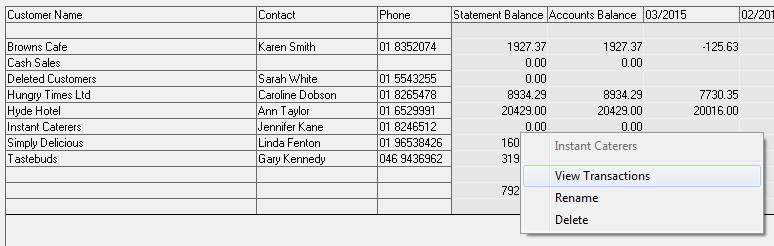 |
- Selecting Delete will move all the related transactions for the selected customer to an account named Deleted Customers.
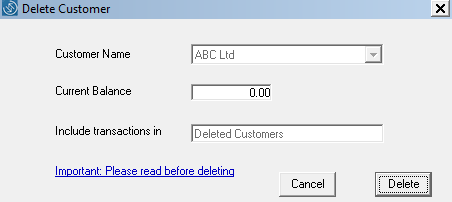
- Only customers can be deleted with a zero balance on their accounts.
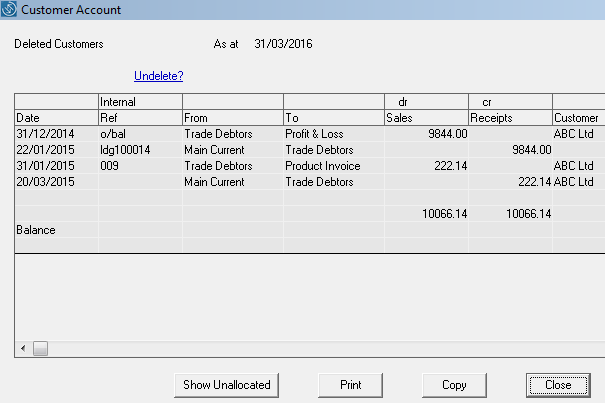
- Care should be taken that the customer is not needed. However, if a customer is deleted in error, they can be undeleted within the Deleted Customers as appropriate.
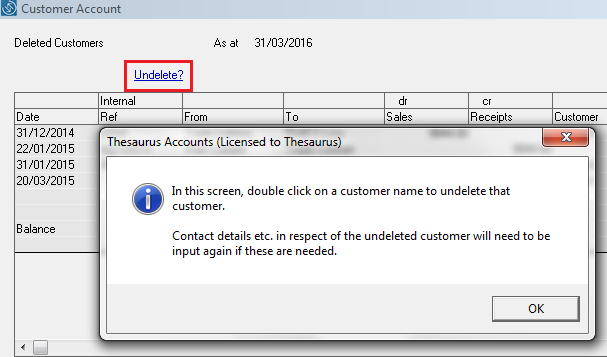
Please note: Care should be taken that customer details will not be needed again example if your audit date is 6 months ago and the customer you intend to delete had transactions in the period to be audited, deletion may not be appropriate.
Important: If you have previously performed an archive of transactions, restoring this archive will lead to problems with your customer listing as many of the archived transactions will no longer have customers to match to.
Comments
0 comments
Please sign in to leave a comment.