
In addition to the preset journal option, the user can build their journals.
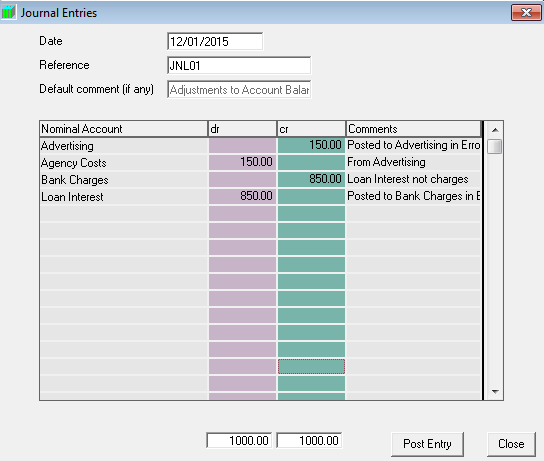
- Navigate- Navigate to Accounts Production> Journals> Ordinary Journals.
-
Date- Enter the effective date of the Journal.
-
Reference- Enter the Journal Reference/ Number.
-
Default Comment- Enter a Journal Description, i.e. the purpose of the posting.
-
Debit Nominal Account- Select the drop-down menu for a list of all your Nominal Accounts. Or, Type the first letter of the nominal code and the second etc. until the correct nominal account appears.
-
Debit Amount- Enter the debit amount for the initial side of the entry as appropriate.
-
Comment- The Default Comment will automatically show in the comment box for each line of the journal entry. However, the user can overwrite this with a user-input narrative for each line should you require a separate explanation for each entry.
-
Credit Nominal Account- Select the drop-down menu for a list of all your nominal accounts. Or, Type the first letter of the nominal code and the second etc. until the correct nominal appears.
-
Credit Amount- Enter the credit amount for the initial side of the entry as appropriate.
-
Post Entry- This will process and save the journal, however, the journal must fully balance so that the total debits equal the total credits before posting is allowed.
You can build the Journal to have as many entries as required.
 |
Comments
0 comments
Please sign in to leave a comment.